 Education
Modern Grade Calculator Online to Convert and Track All Grades Today
- by margotelise
Academic grading can sometimes feel confusing, especially when different courses use different weight systems. Many students today prefer using online tools to track their progress because they save time and remove guesswork.Free grade calculator, weighted grade calculators, and grade conversion calculators make it easy to understand what score you need on assignments, quizzes, or final exams.
This guide will help you understand how these calculators work, why students rely on them, and how to use them effectively throughout the semester.
Why Students Use Online Grade Calculators
Education has shifted towards digital platforms, and grading systems are now more detailed than before. Instead of simple percentage scores, many instructors use:
- weighted assignments
- participation grades
- combined quiz and exam scores
- project-based evaluations
Online grading tools allow students to check their progress without manually calculating formulas each time. These tools are especially helpful for students taking multiple classes with different grading styles.
What Is a Grade Calculator?
A grade calculator is an online tool that helps students estimate or compute their overall performance in a subject. It usually requires:
- assignment scores
- category weights
- overall percentage needed
- missing or upcoming assignments
After entering this information, the calculator will show your current grade and what score you need to achieve your target.
The goal of a grade calculator is to simplify academic tracking so students can stay organized and make informed study decisions.
How a Weighted Grade Calculator Works
Many courses use a weighted grading system. This means each category contributes differently to the final score.
Example of a weighted system:
- Homework: 20%
- Quizzes: 15%
- Midterm exam: 25%
- Final exam: 40%
A weighted grade calculator computes performance based on this structure.
How to Use It
- Enter each category (homework, quizzes, exams, etc.)
- Add the weight assigned by your instructor
- Type the score you earned
- The calculator automatically calculates the weighted result
This method eliminates calculation errors and provides a clear academic picture.
Grade Conversion Calculator
Sometimes grades are given in percentages, other times in letters (A, B, C, etc.). A grade conversion calculator helps convert between:
- percentage
- GPA scale
- letter grades
This is useful when applying for:
- universities
- scholarships
- internships
- international study programs
Such calculators follow standard academic conversion tables, making the process simple and accurate.
Course Grade Calculator: Helpful for Long-Term Tracking
A course grade calculator monitors your progress throughout an entire semester. You can update it after every assignment to see:
- how much you’ve completed
- how much is left
- how each score affects the final grade
- what score is needed on the final exam
Students find this helpful because it gives constant clarity and helps with planning study time.
Benefits of Using Modern Online Grade Calculators
Today’s calculators are designed to be fast, accurate, and simple. Here are some common benefits:
Instant Results
No manual formulas or spreadsheets. A few clicks show your exact grade.
Better Organization
You can track assignments, exams, and deadlines more efficiently.
Accurate Weight Processing
Weighted grades are calculated precisely, avoiding human error.
Motivation and Planning
Knowing how much you need on your next test helps you plan study sessions.
Useful for Every Grade Level
School, college, and university students can all use these tools.
Modern Grade Calculators: What Makes Them Better?
A modern online grade calculator includes advanced features such as:
- automatic weight detection
- GPA conversion
- customizable categories
- real-time updates
- mobile-friendly layout
- “what-if” scenarios
The “what-if” feature is especially helpful. Students can check:
- “What grade will I get if I score 80% on the final exam?”
- “What if my quiz score improves?”
- “What happens if I miss an assignment?”
These predictive tools make the learning process easier and more transparent.
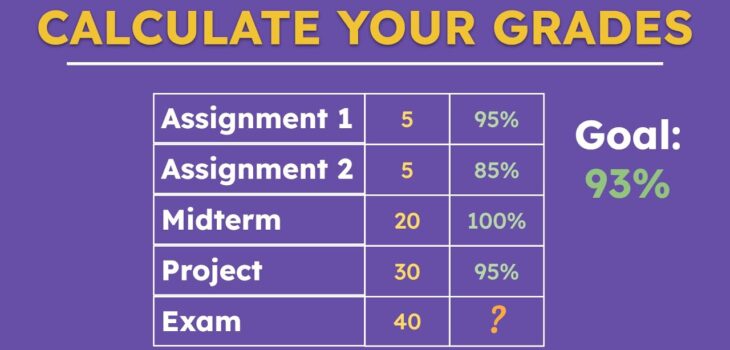
How to Calculate Grades Manually (Simple Breakdown)
Although calculators make it easy, understanding the basic math behind grading is still helpful.
Step 1: Convert your score to a percentage
For example:
18 out of 20 = 90%
Step 2: Multiply by the weight
If quizzes are worth 15%:
0.90 × 15 = 13.5%
Step 3: Repeat for all categories
Add each result to get the final grade.
This method works, but online tools make it faster and error-free.
Choosing a Good Online Grading Tool
Not all tools work the same. When choosing a grading calculator, look for:
- easy interface
- clear instructions
- real-time updates
- no ads or distractions
- ability to adjust weights
- GPA conversion option
- mobile support
A good calculator should feel simple and intuitive.
Tips for Students Using Grade Calculators
- Update your scores regularly
- Double-check assignment weights from the syllabus
- Do not wait until the end of the semester
- Use “what-if” scenarios to plan your study strategy
- Save your calculations to compare progress
These small habits can help improve academic performance and provide how to calculate your final grade significantly.
Final Thoughts
Online grading tools have become a necessary part of modern learning. Whether you need a simple grade calculator, a weighted grade calculator, or a course grade tracker, these tools save time and provide clarity throughout your academic journey. They are reliable, easy-to-use, and perfect for students who want an organized and accurate view of their progress.
By using them regularly, you can stay on track, set realistic goals, and understand exactly what you need to succeed.